Lost the box? Phone suddenly won’t turn on? Or maybe you’re just making sure your Samsung Galaxy S24 is 100% legit before selling it. No worries—checking the serial number on Samsung Galaxy S24 is quick, simple, and you’ve got more than one way to do it. Even if the phone is dead.
Let’s break it down, no tech jargon, no fluff—just clear steps that actually work.
What Is a Serial Number on Samsung Galaxy S24 and Why It Matters
A serial number is a unique ID assigned to one specific Galaxy S24 unit. Think of it like your phone’s fingerprint—no two devices share the same one.
This number matters because Samsung uses it for:
- Warranty validation
- Repair and service history
- Authenticity checks
- Ownership verification
Important note: Serial number is NOT the same as IMEI. IMEI is for cellular networks, while the serial number identifies the physical device itself.
How to Check Serial Number on Samsung Galaxy S24 (4 Easy Methods)
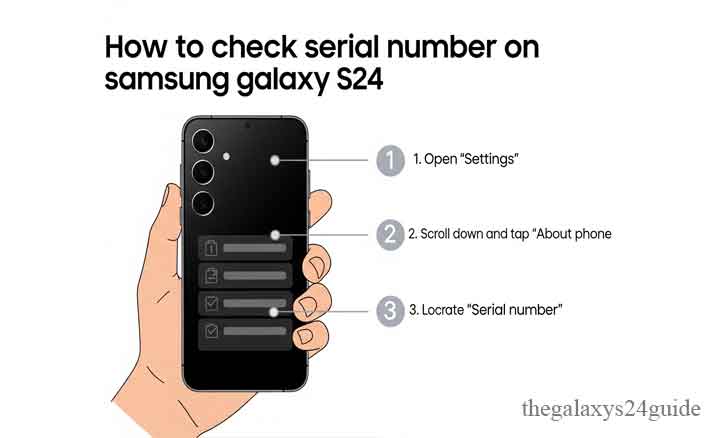
Method 1: Check Serial Number via Settings (Most Accurate)
This is the most reliable and recommended method.
Steps:
- Open Settings
- Scroll down and tap About phone
- Look for Serial number
- That’s it.
Why this method is best:
- Directly pulled from system firmware
- No internet needed
- Impossible to fake
Pro tip: Long-press the serial number to copy it. Super useful when registering warranty or contacting Samsung support.
Method 2: Dial *#06# (Fastest Way)
Need the serial number ASAP? This one’s lightning fast.
Steps:
- Open the Phone app
- Dial *#06#
- Your screen will instantly show:
- IMEI
- Serial number
This method works even:
- Without mobile signal
- Without a SIM card
Perfect for quick checks when buying a second-hand Galaxy S24.
Method 3: Check the Original Box (If You Still Have It)
Still got the retail box? Lucky you. Flip the box and look for the sticker label. You’ll see:
- Serial number
- IMEI
- Model number
- Barcode
Important:
Always make sure the serial number on the box matches the one inside the phone. If it doesn’t, that’s a red flag—especially for used devices.
Method 4: Check via Samsung Account (Phone Lost or Broken)
This one’s underrated but insanely useful.
Steps:
- Log in to your Samsung Account
- Go to Devices
- Select your Galaxy S24
- View device details, including serial number
Best use cases:
- Phone screen is broken
- Phone is lost or stolen
- Need proof of ownership
Read: Samsung Galaxy S24: A Quick Guide to Removing Your SIM Card PIN
Serial Number vs IMEI on Samsung Galaxy S24 (Don’t Mix These Up)
Here’s the simple difference:
Serial Number
- Identifies the physical device
- Used for warranty and repairs
IMEI
- Identifies cellular hardware
- Used by carriers and networks
Bottom line:
Samsung support usually asks for the serial number, while carriers care about IMEI.
How to Use the Serial Number (Real-Life Scenarios)
Your Galaxy S24 serial number is useful for:
- Checking official Samsung warranty
- Verifying device authenticity
- Selling or trading in your phone
- Filing insurance claims
- Booking service center repairs
If you’re reselling, having the serial number ready instantly builds buyer trust.
Common Problems When Checking Serial Number (And How to Fix Them)
Phone Won’t Turn On
No power? No problem.
- Check the original box
- Use your Samsung Account
- Visit an official Samsung service center
Serial Number Doesn’t Match the Box
Possible reasons:
- Refurbished device
- Replaced motherboard
- Non-official repair
What to do:
- Contact the seller
- Verify with Samsung support
- Avoid using it for resale until confirmed
Read: How to Exit Safe Mode on Your Samsung Galaxy S24 Series
Is It Safe to Share Your Samsung Galaxy S24 Serial Number?
Short answer: yes, but carefully. Safe to share with:
- Samsung official support
- Authorized service centers
- Trusted buyers (privately)
Never post it publicly on:
- Social media
- Forums
- Open marketplaces
Why? Because serial numbers can be misused for fake warranty claims.
Expert Insight: How Samsung Uses Serial Numbers Internally
Behind the scenes, Samsung uses serial numbers for:
- Manufacturing traceability
- Quality control
- Supply chain monitoring
- Product lifecycle management
According to qualitative research in engineering and information systems from institutions such as MIT and Stanford University, unique hardware identifiers like serial numbers play a critical role in device authentication, lifecycle tracking, and consumer protection within modern electronics ecosystems.
This is one reason why Samsung takes serial number verification seriously.
Final Thoughts
Now you know all the legit ways to check the serial number on Samsung Galaxy S24, whether your phone is brand new, second-hand, or not even turning on.
If you’re planning to sell, repair, or just stay safe—checking the serial number is a small step that saves big headaches later.
Bookmark this guide. Trust me, you’ll need it again someday.
FAQ:
1. Can I check the serial number if my Samsung Galaxy S24 is dead?
Yes. Use the original box or log in to your Samsung Account to see registered devices.
2. Is the serial number the same as IMEI on Galaxy S24?
No. They are completely different identifiers with different purposes.
3. Can Samsung track my phone using the serial number?
No live tracking. Samsung uses it only for warranty, service, and ownership verification.
4. Where is the serial number stored on Samsung Galaxy S24?
It’s embedded in the device firmware and linked to Samsung’s internal database.
5. Do all Galaxy S24 models use the same serial number format?
Yes, though the prefix may vary depending on manufacturing location.